Play Ludo online 2 player, free in your browser
Looking for Ludo online 2 player without an app? This is the real Ludo board, free in your browser, with no download and no sign-up. Play one-on-one against a friend from anywhere with a room code, pass the device back and forth on the same screen, or take on the computer when nobody is around. You can also fill the board with up to four colours, so the same table works for a quick duel or a full family game.
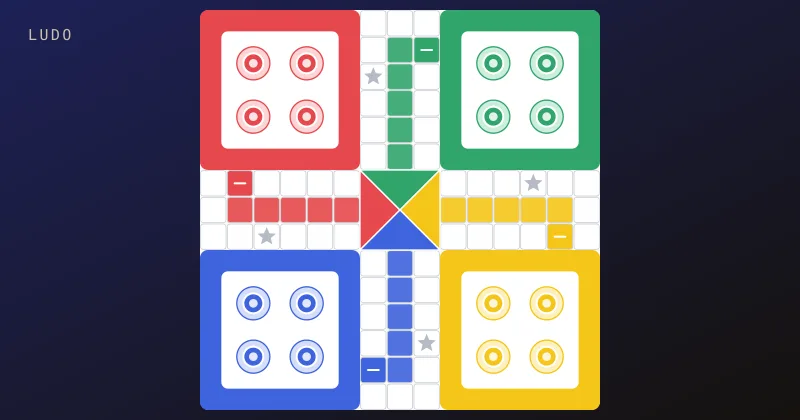
Each player races four tokens from their corner base, all the way round the board and up their own coloured home column. Roll a 6 to come out, knock rivals back to base, hide on the safe stars, and be the first to bring every token home. The lobby offers Create room, Join room, Play vs Computer and Local vs, with no login wall. This Ludo online 2 player page is one of 67 free multiplayer games on My MP Games.
How to play Ludo online with friends
Create a room and share the code
Choose Create room, pick your options, and send the five-character room code or the Copy invite link to your friend. They paste the link or type the code under Join room. When everyone seated presses Ready, the host starts the match with Start match. Once two people are ready, empty seats can stay empty for a true 2 player game, or the host can add computer players in the lobby for three or four colours.
Pass and play on one device (Local vs)
Choose Local vs to play Ludo pass and play on one phone, tablet or laptop. A stepper asks how many people share this device (2, 3 or 4; it defaults to 2). Take turns rolling and moving, then hand the device over. It is ideal for travel, a classroom or the sofa. No second phone, account or room code is needed, and the turn timer is not used in this mode.
Play Ludo vs the computer
Choose Play vs Computer, then pick how many computer opponents you want (1, 2 or 3). The default is a full table — you plus three computer players — but you can set it to one computer for a 2 player game. The match starts at once. The computer plays by the same rules, so it is a good way to learn the board before you challenge a friend.
Ludo rules
These are the default standard rules. Before an online match the host can change house options, such as leaving base on a 1 or a 6, turning safe squares off, or playing until 1 or 2 tokens are home.
Leaving base with a 6
All four of your tokens start in base. A token can only come out onto your start square when you roll a 6. If none of your tokens can use a die, that die is discarded, and if nothing can move, your turn passes.
Moving, capturing and safe squares
Each die moves one token forward by the number rolled. If you have more than one die, you spend them in any order, on one token or split across tokens. If you land on a square holding a single opponent token, that token is captured and goes back to its base. The four start squares and the four star squares are safe, so a token there cannot be captured.
Bonus rolls and three 6s
A 6 means you roll again and the dice pile up (for example 6, 6, 4 gives you three dice to spend). Capturing a token or bringing a token home earns a bonus roll after you have spent the dice you already have. Roll three 6s in a row, though, and you lose the whole turn, including any unused dice.
Exact roll to finish
After almost a full lap, a token turns into your home column. You need the exact number to reach home, and a roll that would overshoot can't be used by that token. The first player to bring all four tokens home wins. In a 3 or 4 player game the others can play on for second and third place.
Ludo controls: mouse, keyboard and touch
On your turn, click or tap the die, then click or tap one of your highlighted tokens to move it. Only tokens with a legal move light up, so you can't make an illegal move by mistake. If more than one pending die could move that token, a "Which number?" popup lets you pick which die to spend; press Escape to close it. There is no separate Roll button, and there are no arrow-key or number-key shortcuts. The die is a button: Tab to it and press Enter or Space to roll. Legal tokens are buttons too — Tab to a highlighted token and press Enter or Space to move it. On phones and tablets everything works with a single tap, and the board fits the screen in portrait or landscape. In online rooms and vs Computer, a 20-second turn timer keeps the game moving; if it runs out, the computer rolls and moves for you. Two missed turns in a row can hand your seat to the computer. The timer is not used in Local vs.
Ludo 2 player strategy and tips
A Ludo online 2 player game is more tactical than a four player one, because every capture hits the one rival you have. Get a second token out early, so a single capture never leaves you stuck in base waiting for a 6. Park on a star or start square when an opponent is close behind you. Use 6s wisely: come out of base when the squares near your start are crowded, but chase and capture when the road is clear. Bonus rolls and piled-up dice are your best weapon, so line up tokens just behind your opponent to turn one turn into several moves. Near the end, spread your risk: a token waiting in the home column is safe, while a lone token on the open track is a target.
Ludo history and variants
Ludo comes from Pachisi, the cross-and-circle race game played in India for centuries. A simplified version with a cubic die was patented in England in the 1890s under the name Ludo, Latin for "I play". It has since spread worldwide, with local cousins such as Parcheesi in the United States, Mensch ärgere dich nicht in Germany, and Trouble with its pop-o-matic die. Here you get the classic standard rules in the browser, for 2, 3 or 4 colours, with online rooms, Local vs and computer players. Related games: Trouble game online, snakes and ladders online, carrom board game online, backgammon online with friends, and how to play Ludo.
Ludo online 2 player FAQ
Can you play Ludo online with 2 players?
Yes. Create a room and share the code with one friend, play Local vs on one device, or play against the computer. Empty seats can stay empty for a true 2 player online game once two people are ready. In Play vs Computer you can also pick a single computer opponent.
How do I play Ludo online with friends for free?
Open the Ludo page, choose Create room and send the five-character room code or the Copy invite link. Your friends join in the browser, free, with no download and no account.
Can I play Ludo pass and play on one device?
Yes. Choose Local vs, pick 2, 3 or 4 players on this device, and take turns on the same phone, tablet or computer.
Do I need a 6 to start in Ludo?
Yes, under the default rules. A token can only leave base onto your start square with a roll of 6. The host can switch this to a 1 or a 6 before the match.
Which squares are safe in Ludo?
The four start squares and the four star squares, when safe squares are on (the default). Tokens on them cannot be captured.
What happens if you roll three 6s in Ludo?
Rolling three 6s in a row forfeits your whole turn, including any unused dice.
Do you need an exact roll to get home in Ludo?
Yes. A roll that would overshoot home cannot be used by that token.
Is this Ludo game free with no download?
Yes. It is a free HTML5 game that runs in any modern browser on desktop, tablet and mobile.