Crazy Eights online with friends is one of the quickest card games to get going: everyone tries to empty their hand by matching the top card on the pile, and any eight is wild. On My MP Games you can play it free in your browser, with no download and no sign-up. Make a room, send the code, and a game for 2 to 6 players starts in seconds. If your friends are busy, computer players fill the empty seats.
How to Play Crazy Eights Online With Friends
Start a room and share the code
Press Create room and you get a short room code and an invite link. Send either one to your friends in any chat app. They open the link, or enter the code on mympgames.com, and sit down at your table. Up to 6 people can play, and computer players can take any seat nobody is using.
Play on one device or against the computer
Nobody free? Choose vs Computer and play against computer opponents. They follow the same rules as people, so it is good practice before a game with friends. With Local vs you pass one phone or laptop around, and a screen hides each hand between turns.
Crazy Eights Rules
The deal and the starter pile
The game uses a standard 52-card deck. With 2 players each player gets 7 cards; with 3 to 6 players each gets 5. The rest of the deck is the stock. Its top card is turned over to start the discard pile, and an 8 is never used as the starter: it goes back into the deck and another card is turned.
Matching suit or rank
On your turn, play one card that matches the top discard by suit (a heart on a heart) or rank (a 7 on a 7). Play then passes to the next player.
Wild eights
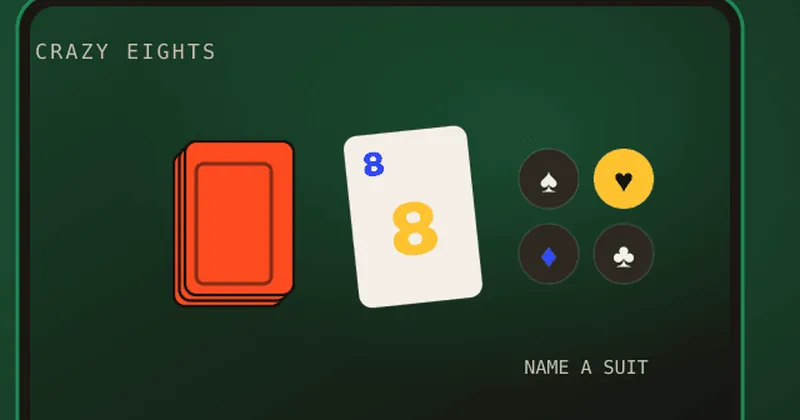
An eight can be played on any card. When you play it, you name the next suit, and the next player has to follow that suit or play another eight. Eights do not stack or make anyone draw; they only change the suit.
Drawing and winning
If you cannot play, or would rather not, draw one card from the stock. If that card fits you may play it straight away; otherwise you pass. When the stock runs out, the discard pile is reshuffled into a new stock. The first player to get rid of every card wins the round and scores the cards left in the other hands: 50 for each eight, 10 for a king, queen or jack, 1 for an ace and face value for the rest. The first player to reach 100 points wins the game. If nobody can play or draw at all, the round ends and the lowest hand wins it.
Controls (Keyboard and Touch)
- Touch (phone or tablet): tap a glowing card in your hand to play it. Tap the stock or the Draw a card button to draw, then play the drawn card or tap Pass. After an eight, tap a suit to name it.
- Mouse: click a glowing card to play it, and click the stock to draw.
- Keyboard: Tab moves between the cards you can play and the buttons. Enter or Space plays the focused card or presses the button.
The table resizes to fit any screen, so a game started on a laptop works the same on a phone.
Game Modes
- Online with friends: a private table for 2 to 6 people on their own devices, joined by room code or invite link.
- Challenge online players: see who is free in the arena and send an invite.
- Local vs: pass one device around the table.
- vs Computer: computer players fill any empty seat, so you can play solo at any time.
Tips to Win at Crazy Eights
- Hold on to your eights. A wild card gets you out of trouble when nothing else matches. Use it late, but not too late: an eight left in your hand counts 50 points to the winner.
- Name the suit you have most of. When you play an eight, pick the suit you hold the most cards in.
- Change suit with rank matches. If the top card is the 9 of clubs and you hold the 9 of hearts, playing it moves the game into hearts without spending an eight.
- Watch hand sizes. When a rival is down to one or two cards, switch away from the suit they seem to want.
- Get rid of high cards early. Kings, queens and jacks cost 10 points each if someone else goes out first.
History and Variants of Crazy Eights
Crazy Eights belongs to the shedding family of card games. It is closely related to the Central European game Mau-Mau, and it became popular in English-speaking countries in the mid-20th century. Commercial games such as UNO later built on the same idea of matching colour or number with wild cards. Common house rules include:
- Twos draw: a 2 makes the next player pick up two cards.
- Queen of spades: the next player draws five.
- Skip and reverse: aces or jacks skip a player, and queens reverse the direction of play.
Our version plays the classic rules (match suit or rank, eights wild, draw one, score to 100), so it is easy to learn and quick to play.
Want more card games to play with friends? Try Rummy online, the Hearts card game, Blackjack with friends or the War card game, or see every free multiplayer game among our 50+ games.
Crazy Eights FAQ
Can I play Crazy Eights online with friends for free?
Yes. Create a room, share the code or invite link, and up to 6 players can join free, with no download or account.
How do you play Crazy Eights?
Match the top card by suit or rank. Eights are wild and let you name a new suit. If you cannot play, draw one card. The first to empty their hand wins the round.
What are the rules for Crazy Eights card game?
A standard 52-card deck, 7 cards each with 2 players or 5 each with 3 to 6. Match suit or rank, eights are wild, draw one card when you cannot play, and the first player out scores the cards left in the other hands. First to 100 points wins.
Can you play Crazy Eights 2 player online?
Yes. A table works with just 2 players, each dealt 7 cards, or you can add computer players.
Can I play Crazy Eights against the computer?
Yes. Choose vs Computer and computer players fill the seats.
Is Crazy Eights the same as UNO?
UNO is a commercial game based on the same shedding idea. Crazy Eights uses a normal deck of cards, with eights as the wild cards.
Is there a Crazy Eights multiplayer game on my phone?
Yes. It runs in any mobile browser with touch controls, so there is no app to install.